Your website’s homepage is often the first impression potential customers have of your business.
It needs to do more than look professional. It should clearly explain what your business offers, build trust, and encourage visitors to take the next step.
But what exactly should you include on your homepage?
In this article, we’ll cover seven essential homepage elements every small business website needs, from an attention-grabbing headline to a clear call-to-action (CTA).
We’ll also explain additional website components that help improve security, user experience, and visibility in search engines.
7 Critical Homepage Elements for Small Businesses
Your homepage is one of the most important pages on your website because it helps visitors decide whether your business is right for them.
Think of your homepage as a table of contents for the rest of your website.
It should give visitors a quick overview of what you offer, why they should choose you, and where they can find more information.
Here are seven key elements to include in your website homepage design.
1. An Attention-Grabbing Hero Section
The hero section is the first thing visitors see when they land on your website, before scrolling down.
This area is also known as “above the fold,” a term that comes from newspapers, where the most important stories appeared on the top half of the front page.

Your hero section should immediately answer three questions:
- What does your business do?
- Who does your business help?
- What should visitors do next?
Start with a clear headline that explains what you offer and who it’s for.
For example, instead of saying “Welcome to ABC Accounting,” you could say “Stress-Free Bookkeeping and Tax Services for Small Businesses.”
This tells visitors exactly what your business does and who your services are for.
Underneath your headline, include a short description explaining your main benefits.
You should also include a prominent CTA button, such as “Book a Free Consultation” or “Get a Quote.”
Other important hero section elements include:
- Your logo: Place your business logo in the upper-left corner or centre of your navigation bar.
- Navigation links: Include three to four main links, such as Home, Services, About, and Contact. Use dropdown menus if needed.
- High-quality visuals: Use images showcasing your services, products, or the results customers can expect.
- Trust signals: Highlight relevant credentials, customer ratings, or unique benefits, such as “Licensed and Insured” or “48-Hour Delivery.”
You can use a static image, image slider, or short looping video in your hero section.
However, avoid adding too many design elements that distract visitors. If you use video, keep it short, muted, and optimized for fast loading.
Also, make sure your headline is easy to read against the background image.
Pro tip: Your website should use responsive design so it looks good on desktop computers, tablets, and smartphones. On mobile devices, your navigation bar can become a hamburger-style navigation menu to save space.
2. A Clear Overview of Your Services
Once visitors understand what your business does, they need to know what services or products you offer.
Your services section should provide a simple overview of your main offerings.

You don’t need to explain every detail here. Instead, give visitors enough information to understand each service and link to dedicated pages where they can learn more.
For example, a landscaping business might highlight:
- Garden Design: Create an outdoor space that suits your home and lifestyle.
- Lawn Maintenance: Keep your lawn healthy and looking its best.
- Tree Trimming: Maintain your trees and remove overgrown branches safely.
Each service can include a short description, relevant image, and link to the full service page.
Use benefit-focused headlines instead of generic headings.
For example, rather than simply writing “Our Services,” you could say “Keep Your Garden Looking Beautiful.”
This helps tell your brand’s story, even when visitors only skim your homepage content.
You can also use relevant keywords naturally throughout this section to help search engines understand your website.
Keep your website design clean, with plenty of white space between each service.
3. A Trust-Building About Section
People want to know who they’re doing business with, especially when choosing a small business.
Your About section gives you an opportunity to introduce yourself, your team, and what makes your business different.

This is where you can showcase your personality and help potential customers feel more comfortable choosing you.
Include information such as:
- How long you’ve been in business.
- Your team’s experience and qualifications.
- What makes your services different.
- Your company’s values or approach.
- Photos of yourself, your employees, or your team at work.
For example, instead of using a generic heading like “About Us,” a plumbing company could say “Helping Local Homeowners Solve Plumbing Problems for Over 15 Years.”
This immediately communicates experience and builds credibility.
Whenever possible, use real photos instead of generic stock images. Authentic visuals help customers see the people behind your business.
You can still use professional stock photos when necessary, but they should support your message rather than replace genuine images of your business.
Keep this section relatively short and include a link to your full About page for visitors who want to learn more.
4. Customer Testimonials and Social Proof
Even if your website looks professional, visitors may still wonder whether they can trust your business.
This is where customer testimonials and social proof become important.

Reviews help potential customers understand what it’s like to work with you and what results they can expect.
According to BrightLocal’s 2026 Local Consumer Review Survey, 97% of consumers read online reviews for local businesses.
You can showcase several types of social proof on your homepage, including:
- Customer quotes: Short reviews explaining what customers liked about your services.
- Star ratings: Your average rating on platforms such as Google.
- Client logos: Logos of recognisable businesses you’ve worked with, with their permission.
- Case studies: Brief examples of problems you’ve solved for customers.
- Awards and certifications: Industry recognition demonstrating your expertise.
For example, a website designer might feature a testimonial from a small business owner explaining how their new website helped generate more enquiries.
This is more convincing than a generic review that simply says “Great service!”
When possible, include the customer’s name, business, and photo to make the testimonial more credible.
You can also link to longer case studies or your testimonials page.
Pro tip: Choose testimonials that address common customer concerns, such as pricing, reliability, quality, or results. This helps visitors feel more confident about taking the next step.
5. A Frequently Asked Questions Section
Your homepage should answer the most common questions potential customers have about your business.
A frequently asked questions (FAQ) section is a simple way to do this.
It improves the user experience by helping visitors find answers without having to contact you or search through multiple pages.
For your homepage, focus on three to five questions customers regularly ask.
For example, a cleaning company might answer:
- What areas do you serve?
- Do you bring your own cleaning supplies?
- How much does a cleaning service cost?
- Are your cleaners insured?
- How can I book an appointment?
Keep the answers short and easy to understand.
You can provide more detailed information on your individual service pages.
FAQs can also support your SEO strategy by naturally including relevant keywords and answering questions people search for online.
6. A Strong Closing Call-to-Action
After explaining your services, introducing your team, and building trust, your homepage needs to encourage visitors to take action.
This is where your closing call-to-action comes in.

Your final CTA should remind visitors of the value your business offers and clearly explain what they should do next.
For example, a home renovation company might say:
“Ready to Transform Your Home? Get Your Free Renovation Quote Today.”
Underneath, include a CTA button that says “Request a Free Quote.”
Other effective CTAs include:
- Book an Appointment
- Schedule a Free Consultation
- Contact Our Team
- Request a Demo
- Get Started Today
Make sure your CTA button stands out from the rest of your homepage design. You can do this by using a contrasting colour and leaving enough space around the button.
You can also create a sense of urgency when appropriate, such as mentioning limited appointment availability, provided the claim is accurate.
Remember: You don’t need to wait until the bottom of your homepage to include CTAs.
Include a primary CTA in your hero section and repeat it naturally throughout your homepage.
This makes it easy for visitors to take action whenever they’re ready.
7. An Informative Website Footer
The footer is the section at the very bottom of your website. Although it’s easy to overlook, it plays an important role in helping visitors find information and navigate your website.

Your website footer should include:
- Contact: Include your business address, phone number, and email address so customers can easily reach you.
- Hours: Display your opening hours so visitors know when your business is available.
- Socials: Add links to your social media profiles so visitors can connect with your business on other platforms.
- Other: Include links to important pages, such as your About page, FAQs, or additional services.
- Copyright: Add a copyright notice to identify the owner of your website content.
- Image credits: Credit photographers or image sources where required.
- Privacy policy: Link to your privacy policy so visitors can understand how your business collects and uses their personal information.
You can also include relevant awards, certifications, or industry memberships to build trust. Keep your footer simple and organised so visitors can quickly find what they need.
What Does an Effective Homepage Layout Look Like?
Now that you know which elements to include, let’s look at how they all fit together.
Your homepage should guide visitors through a logical journey, starting with what your business offers and ending with a clear next step.
Here’s an example of how to structure your small business homepage from top to bottom.
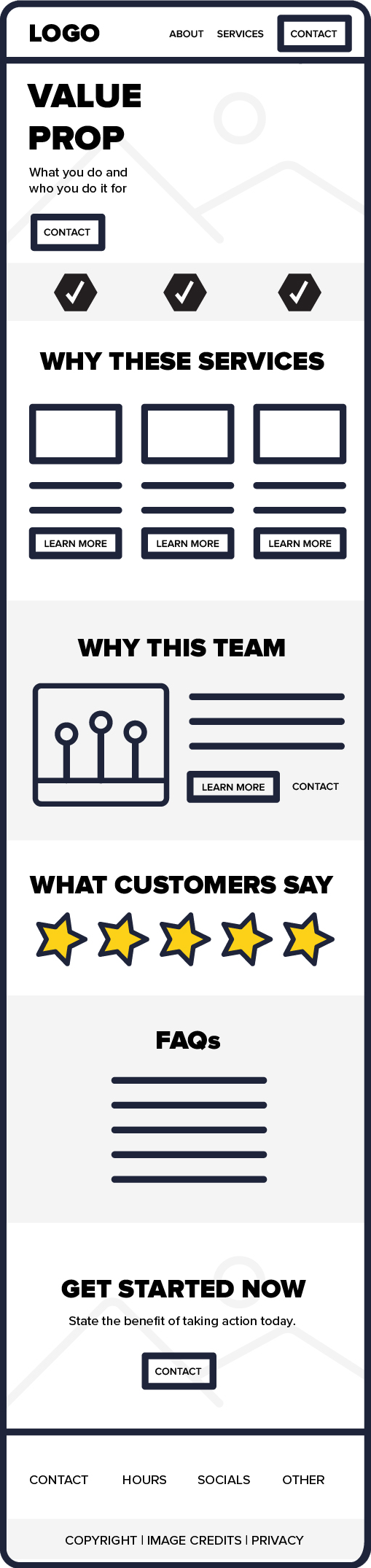
Notice how each section has a specific purpose.
The hero section grabs attention, the services and About sections explain your value, and the testimonials build trust.
The FAQs then address common concerns before the closing CTA encourages visitors to take action.
Finally, the footer provides essential contact details and useful links.
This creates a clear, easy-to-follow website homepage that helps visitors find the information they need.
Not sure how to put these homepage elements together? At Jottful, we’ve built more than 2,000 small business websites, and we’d love to build you a free sample website so you can see what your website could look like before you commit to anything.
Additional Website Components You Need
Having the right homepage elements is important, but you also need a strong technical foundation.
This helps your website run smoothly, protects customer information, and makes it easier for people to find your business online.
Here are four additional website components every small business should understand.
Domain
Your domain name is your website’s address on the internet.
For example, if your business is called Green Valley Landscaping, your domain might be greenvalleylandscaping.com.
A good domain name should be:
- Short and easy to remember.
- Relevant to your business name.
- Easy to spell and pronounce.
- Free from unnecessary numbers and hyphens.
You typically register your domain through a domain registrar and pay to renew it annually.
Ideally, your business should own and control its domain registration, even if someone else manages your website.
Hosting
Website hosting is the service that stores your website’s files and makes them accessible online.
Without hosting, visitors wouldn’t be able to access your website.
Good hosting is important because it affects your website’s speed, reliability, and performance.
When choosing hosting, look for reliable uptime, fast loading speeds, security features, and customer support.
The good news is that some website builders, including Jottful, include hosting in their monthly subscriptions. This means you don’t need to find or pay for a separate hosting provider.
SSL Certificate
An SSL certificate helps secure the connection between your website and its visitors through HTTPS encryption.
This is especially important if customers submit contact forms, enter personal details, or make payments on your website.
Websites with HTTPS typically display a padlock or site-controls icon in the browser, depending on the browser being used.
Without HTTPS, browsers may warn visitors their connection isn’t secure.
Jottful includes SSL certificates with its website subscriptions and automatically renews them, so you don’t need to worry about purchasing or managing one yourself.
SEO
Search engine optimisation (SEO) helps search engines understand your website and makes it easier for potential customers to discover your business.

A good SEO strategy includes:
- Using relevant keywords in your homepage content, headings, and page titles.
- Writing a compelling meta description summarizing your page.
- Adding descriptive alt text to important images.
- Creating a clear website structure with internal links.
- Improving website speed and mobile usability.
You should also make sure your website is easy to navigate.
For example, a clear navigation menu, readable text, and a logical visual hierarchy can improve user engagement.
Google also recommends monitoring Core Web Vitals, which measure loading speed, responsiveness, and visual stability.
Together, these elements help create a website that’s user-friendly and easier for search engines to understand.
FAQs
What Makes a Good Homepage?
A good homepage clearly explains what your business does, who it helps, and what visitors should do next.
It should have an attractive, professional design that’s easy to navigate.
The most important homepage elements include a strong headline, clear navigation, high-quality images, service descriptions, customer testimonials, and prominent CTAs.
An effective homepage should also load quickly, work well on mobile devices, and make it easy for visitors to find information.
The goal is to create a positive user experience encouraging people to explore your website and contact your business.
What Content Should Be on a Homepage?
Your homepage content should give visitors a clear overview of your business.
Start with a hero section that includes your main headline, a short description of your services, and a CTA button.
Then, include sections covering your services, company background, customer testimonials, and frequently asked questions.
You should also include a closing CTA and a footer with your contact details.
The key is to provide enough information to build trust without overwhelming visitors.
What Are the Tabs on a Website Called?
The tabs at the top of a website are usually called navigation links or menu items. Together, they form the website’s navigation menu or navigation bar.
Common examples include Home, About, Services, Blog, and Contact. These links help visitors move between different pages on your website.
Some websites also include dropdown menus that display additional pages when users click or hover over a main menu item.
Larger websites may include a search bar to help visitors find specific information.
Good website design includes user-friendly navigation that’s simple, organised, and easy to use on mobile devices.
What Is the Bottom Section of a Website Called?
The bottom section of a website is called the footer. It usually appears at the bottom of every page and contains useful business information.
A well-designed footer makes it easier for visitors to find important information, such as your contact details and operating hours, and builds additional trust in your business.